Your Mix.
Your Rules.
Hardware-grade audio mixing for competitive players. Tactile USB-C control over every channel, every source — tune the rest in seconds with the included MixrU companion app.
Hardware precision,
software simplicity.
Map Any App to Any Fader
Drag Discord, Spotify, your game, OBS, even a browser tab — any app on your system — onto any fader, knob, or button. Reassign in the companion app in seconds.
0ms Latency
MixrU controls volume directly at the system level — adjusting any app's output instantly, with zero latency, right from your machine.
Plug & Play USB-C
One USB-C cable and your mixer is live — power, audio, and control all in one. The companion app unlocks full software mixing, ready in seconds.
3 Customizable Buttons
Map each button to skip track, play/pause, mute, push-to-talk, or scene change. Reassign anytime in the app.
MixrU Companion App
Free for Windows. Drag-to-assign every fader and button. Save unlimited profiles — one per game, per scene, per mood.
Built for Windows
MixrU is built exclusively for Windows — deep system integration, native audio control, and a lightweight companion app designed around the Windows audio stack.
Control any app.
On its own fader.
Assign Discord, Spotify, your browser, your game, and system audio to their own physical fader. Slide one down without ducking the rest — no software juggling, no alt-tab.
- Game Audio
- Discord
- Spotify
- Browser
- System Sounds
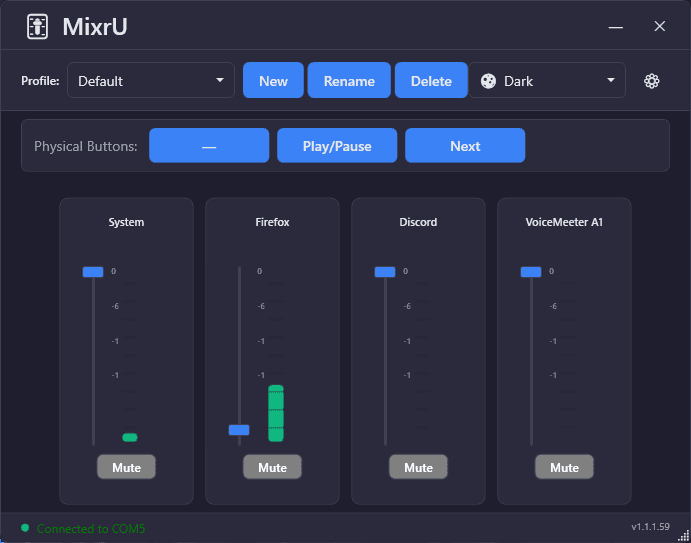
v1.1.59 — Free companion app
MixrU.
Built for Windows.
MixrU is the free companion app that brings your MixrU mixer to life. Assign any app to any fader, create and switch profiles in seconds, and map your physical buttons — all from a clean, native Windows interface that stays out of your way.
- Windows Only
- Lightweight
- ~12 MB Install
- Dark & Light Mode
- Runs in Tray
- Supports Arabic and English